 GoodLinks
 Missing Main Menu on macOS
When Show Icon in is set to Menu Bar Only on macOS, the GoodLinks main menu is not visible, even when a GoodLinks window is active.
You can still open Settings without changing modes by right-clicking the GoodLinks icon in the menu bar and selecting Settings….
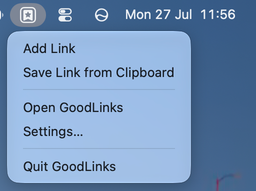
To show the main menu, open Settings > General, then change Show Icon in to Dock Only or Both Dock and Menu Bar. The main menu will appear in the macOS menu bar when GoodLinks is active.